PublicData.com Frequently Asked Questions
FAQs
What is your privacy policy?How do I change data in the PublicData databases?
How to update my Public Data Account personal information?
How do I update my credit card information?
How do I cancel my account?
What is your refund policy?
How do I renew or reactivate my account?
Why do you need a Texas Sales Exemption Certification from me?
Do you support mobile devices?
How does Address Verification work?
How do I use the PublicData.com Website?
What billing options are available to me?
Explanation of differences between types of accounts
I have not received an email with my password
SPAM Filters
Billed Accounts (Corporate Customers Only)
How we count Search Look-ups
Search Count Limits
How to get Bonus Look-ups
Sales Tax
W9 form - Federal Tax Id request
Managing Your Account
Tell me about your AutoSearch Favorites Feature
Tell me about your $100 bounty
Table of Contents
Account Registration
Look-up Counts and Limits
Managing Your Account
PublicData Home Page Services
Billing Information
Tax Information
Searching records on PublicData
Account Registration
PublicData accounts are easy to establish. Simply click Register an Individual Account or Register a Corporate Account, from the PublicData home page, and proceed through a few easy steps. Upon completion of the registration, your new account is available for immediate use!
Individual or Corporate Account?
The easiest way to determine if a customer should register for an individual or corporate account is to ask the question, "Will the account have a single user, or will multiple users be accessing the same account?" Individual PublicData accounts require a credit card to establish and maintain the account, and sales tax will be applied. Tax exempt status is not an option with individual accounts.
A corporate account is set up using the business' name. For security purposes, we recommend this account for any business with multiple users on the same account. PublicData corporate accounts may be billed or use a credit card to maintain the account. Sales tax will be applied, however corporate accounts may apply for tax exemption. It is the account holder's responsibility to apply for the sales tax exemption.
Selecting a Plan
PublicData offers several Individual and Corporate Plans. Both types of plans offer monthly and annual payment options. Choosing a plan involves determining the approximate number of searches needed, either on a monthly or annual basis, and comparing this estimation to the plans available. Click here to use the PublicData Pricing List to assist you with your plan decision.
All PublicData accounts are automatically billed on a recurring basis, either monthly or annually, until the customer cancels this process by clicking Cancel your account on the PublicData home page. For example, say you sign up for an account on January 15th that bills monthly. On February 15th, an invoice would be generated, and your credit card would be charged. The same process would occur on March 15th. On March 20th, if you decided to cancel your PublicData account, you would do so by logging on and clicking the link on the homepage. For your convenience, you would still be able to login to PublicData and use your account until the end of your billing cycle, which in this case would be April 14, provided you have not exceeded your allotted monthly 'Look-ups.' On April 15th, the beginning of the next billing date, your account would change to inactive.
The same is true for annual accounts which would invoice, bill, or charge the amount due on the anniversary date each year. The only way that the yearly anniversary date or monthly billing date can be changed is if the customer requests the change because all of the account's 'Look-ups' were used.
Billing is processed at the beginning of the invoiced period. Refunds are not given for unused days within an invoiced period.
Individual Account Number
To login and access PublicData functions, use your username. Due to enacted legislation, and our expanding efforts to reduce fraud, PublicData.com is required to keep a record of anyone accessing the public records database. By verifiying your identity, you help us to fulfill these security measures and maintain accurate records.
Individual Account Password Email
Once the individual account is established, a password will be emailed to the registrant. If the account password is lost or forgotten, the customer may click Retrieve your password from the PublicData home page.
Corporate Account Name Email
After a corporate account is established, the account name will be emailed to the registrant. If the
account password is lost or forgotten, the customer may click Retrieve your password from the PublicData
home page.
Corporate accounts have a different pay structure and some privileges that individual accounts do not
have. A phone number is required so that we can reduce fraud and improve security with our corporate
customers. Newly registered accounts choosing the invoice billing option (as opposed to utilizing a
Credit Card) will not receive their password until PublicData.com has contacted the customer through the
registered phone number. This typically will happen within one business day.
Corporate Account Billed Option
This option is a privilege only available for corporate account customers. If Billed Payment Plan is selected when creating the account, a check or money-order payment is expected promptly. Click here for more information on Billing Options. If payment is not received within a reasonable time frame, the account will be deactivated until payment is received. To reactivate the account with an outstanding balance, a valid credit card will be required. If a credit card is not available and an outstanding balance exists, a payment must be received before the account can be reactivated. Multiple deactivations for failure to remit payment for the billed amount will disable the Billed Payment Plan privilege for the account.
SPAM Filters
You must allow our email to pass through your SPAM filters. If you do not receive your password or account name email within 15 minutes, you or your Internet provider probably have a SPAM filter which has trapped our email response to you. Please do not sign up for additional accounts as you will get billed for these extra accounts.
Many email providers, such as AOL, Google, MSN, Yahoo, etc. allow customers to filter SPAM -- please set your filters to allow email from PublicData.com. Some email based SPAM filters look at your address book to determine if the email should be delivered or discarded. If your SPAM filter works this way, as AOL does, place WebInfo@PublicData.com into your address book.
Please note, AOL has "Additional Spam Filters" which by default permanently delete email instead of sending them to your SPAM folder!
PublicData cannot respond to a real-time or interactive email address challenge such as those provided by NetZero and some other large ISPs. Please communicate with your anti-SPAM device or program and clear or "whitelist" any inbound email from PUBLICDATA.COM.
Once you have enabled our ability to email you, please click Retrieve your password from the PublicData home page.
Look-Up Counts and Limits
One of the most frequently asked questions at PublicData is, "What is a Look-up?" A Look-Up is simply a result of your actions while using PublicData. A Look-Up will be applied to your account through several different ways. We will deduct one Look-Up for (1) every search performed, (2) every detail selected from the search results page, and (3) for each new page of search results you visit. By default we display 100 detail results per page. If your search should return more than 100 results, a Look-Up will be applied to your account for each additional page you visit. Basically, any click that results in a search result list or a detail screen will be counted as a Look-up.
Search Look-up History
Once logged in and at the Search Screen, one of the services available is examination of the account's Look-up History. Clicking this service shows the current Look-up status of the account for the current invoice period, as well as a historical list of Look-ups used in previous billing cycles. The customer can click an invoice date within this historical list and another list is generated with information on the number of Look-ups charged for each day of activity within that billing period.
Search Count Limit
When establishing a PublicData account, the various plans determine: how frequently you are billed, the amount to be billed and the number of searches during billing period that are purchased (referred to as the Search Count Limit). If the Search Count Limit is not exceeded before the end of the billing cycle, the new billing cycle begins with a refreshed Search Count Limit and PublicData service is not interrupted. However if the Search Count Limit is exceeded before the end of the billing cycle then Bonus Searches are used until they are exhausted and then PublicData service is interrupted. If service has been interrupted, the customer has two choices: (1) wait until the billing cycle is over when the Search Count Limit is refreshed, or (2) apply to reactivate the account. Reactivating the account will establish a new invoice and will refresh the Search Count Limit, immediately granting access back into the system.
Bonus Look-up
Bonus Look-ups can be very valuable because, if the Search Count Limit has been exceeded, but the billing cycle has not ended, then the bonus searches can be used to assure that service is not interrupted until the cycle is complete. PublicData Bonus Look-ups are easy to earn and do not expire as long as your PublicData account is kept active (the bonuses carry over between billing cycles). Bonus Look-ups can be earned two ways.
First, when creating an account with PublicData, you are asked to provide a reference as to where you heard about PublicData. The number one answer we receive is that people heard it from a friend. Therefore, to reward our customers for talking about PublicData.com, we have a Bonus program that provides you with Bonus Look-ups when new accounts come from your referrals.
The program works this way. You can request a Bonus URL link to be sent to your email address by clicking on Refer Friends & Get Free Look-ups from your home page. When you receive the email, it will contain a link to a PublicData.com Create an account page. Forward this link to your friends. If they join PublicData through this link and create their own PublicData.com account, your account is credited with 100 Bonus Look-ups.
The second and easiest way to earn Bonus Look-ups is to pay with a credit card. Each time your credit card is charged by PublicData, your account is credited with 100 Bonus Look-ups. Customers who have a monthly account can earn an extra 1,200 Look-ups per year, which reduces the cost per search dramatically.
Managing Your Account
After logging in and clicking the Continue button, the customer should be on the Search Selection screen. All options to manage your account can be reached from this screen.
Account
Clicking this link allows you to edit information regarding this account. Please keep your email address up to date and change your password if you ever suspect that someone knows your PublicData password. Your password will never be displayed by PublicData.
Changing your billing plan cannot be done without the help of a Customer Service Representative at PublicData.
Update Billing Info
This option allows you to edit your credit card and address information on file for your account. When this screen is presented to you, your card number will be masked. This way, you can still identify it, but the full card number is not usable by any other viewer.
For your security, when updating your card information, we will ask you for the security code on the back of the card usually in or near the signature block.
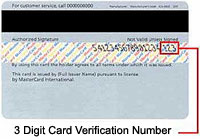
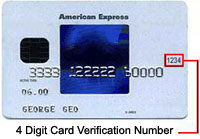
PublicData will only pass this security number on to your card issuer for verification but the number will not be stored with PublicData. Therefore, anytime any information is changed in the billing information, we will always ask for this number again.
PublicData uses multiple methods to verify the customer's address. When accepting a credit card, we will verify with your card issuer that the address is correct. If you receive a bad address prompt associated with entering credit card information, please check to verify where the monthly card statement is mailed. A subsequent verification using the USPS database requires that the street, city and zip fields match their database. The street information creates the most confusion in this situation; using 'Road' instead of 'Circle' or 'Blvd' or simply omitting some part of the street name may cause it to reject the address completely. Please try to be as accurate as is possible when entering this address information.
Account History
Clicking this link provides a display of all invoice and payment history associated with this account. The most recent billing statement may be printed and sent with your payment to PublicData if you have an outstanding balance. For those accounts that do not automatically generate a billing statement, a printable billing statement can always be created by clicking on the 'Create a Printable Billing Statement' link at the bottom of the account history. If you need a receipt, simply click on "Pay Credit" on the account history page.
Look-up History
Clicking either History link will give a complete history of all searches purchased, used, and bonuses.
Clicking Earn More Free Look-ups will generate an email sent to you explaining how to earn more Bonus Look-ups by having a friend join PublicData.
Click to find out more about Look-ups.
PublicData Home Page Services
Cancel Your Account
Simply click here to cancel your account. You will be asked to provide your login information and password. You should receive a confirmation screen, and an email will be sent verifying the action. Please be sure to read all of the instructions on the page to understand how final billing will happen.
Retrieve Your Password
You may click here if you need to retrieve your password. You will be asked to provide your login information and the email address used when registering this account. You should receive a password within 15 minutes via email. Please read the instructions on the Retrieve your password screen to insure that your password is received properly. If the registered email has changed, please contact a PublicData Customer Service Representative, and they will assist you with those changes.
Reactivating Your Account
If you canceled your PublicData account in the past and wish to reactivate it, simply login with your original account name and password on the PublicData home page and click Logon. The system will recognize that you are an former customer and begin your access immediately. Welcome back!
What billing options are available to me?
Credit Card Accounts
This is PublicData.com's most convenient option. It is the only option available for our non-corporate accounts and is by far the most popular option for our corporate accounts. Simply choose this option and PublicData will automatically charge your card when your account is renewed. With this option, a printable Billing Statement can be created by the customer at any time by using the 'Create a Printable Billing Statement' link at the bottom of the 'Account History' page.
Paperless Billing
This option is only available to our corporate accounts (those accounts where the state ID is CORP). Customers who choose this option will be required to pay by check. When your account is renewed PublicData.com will create a Billing Statement, attach it to your account, and send you an email containing a link to the statement. You will be able to access your statement through this email for 30 days or at any time by logging onto your account and clicking on the Account History link.
Paperless Billing is a convenient option allowing you to print your own statements, share electronic billing statements with your accounting departments, receive your statements up to two weeks sooner, and use fewer resources than paper billing. In short, paperless billing saves resources, money and time.
Postal Billing
This option is no longer available and has been replaced with our Paperless Billing option above.
Tax Information
Sales Tax
PublicData's Corporate offices and production servers are located in Texas, making the service subject to Texas Sales Tax per TITLE 34 PUBLIC FINANCE, PART 1, CHAPTER 3, SUBCHAPTER O, RULE 3.330, (a), (3). as quoted here: "Internet access service - a service that enables users to access content, information, electronic mail, or other services offered over the Internet and may also include access to proprietary content, information, and other services as part of a package of services offered to consumers. Internet access service does not include any other taxable service, unless the taxable service is provided in conjunction with and is merely incidental to the provision of Internet access service. Individuals providing Internet access should refer to 3.366 of this title (relating to Internet Access Services)."
The Texas sales tax rate for the Dallas area is 8.25%. The location of your home or office has no bearing on the calculation of this rate.
Sales Tax Exemption
If your organization is exempt from sales tax, please complete the appropriate form below and submit online:
These forms require Adobe Acrobat Reader
Please submit only the online exemption forms.
These forms provide us with the legal basis to NOT charge you sales tax, and is required by the State of Texas. Please understand that these forms are official State of Texas documents, so it is important to be as complete and accurate as possible. Without these forms, we must charge the tax, even if you are an agency of the Federal or State government.
Sales Tax Refunds
If sales tax was charged before the online exemption forms were filed, a sales tax refund is due. Please notify us via email as soon as is possible. If done prior to our paying the State of Texas, we can refund the money directly. If done after we have paid the State, you will have to file a form with the State of Texas and go through a lengthy confirmation process in order to get a refund check from the State of Texas.
Federal Tax ID - Form W9
PublicData.com is incorporated in the State of Texas as a Limited Partnership under the official name of: The Source For PublicData, LP. The partnership's federal tax ID or EIN/TIN number is: 90-0232788. If you need a copy of Form W9 for PublicData, click here for a copy of form W9 and print.
Searching for Records on PublicData
Once you create an account with PublicData and have received your password, you may visit the PublicData home page and logon to your account. To learn how the system works, you may view the brief PublicData Demo from the home page, or read the following details.
Logon and proceed to the Search Selection page from the Welcome page. On this screen, select the PublicData database that is to be searched. Databases usually have various criteria by which they may be searched such as name, date of birth, or number (Plate Number or VIN.) Each database lists these search criteria.
Searching By Name
To search by name, go to the Search Selection page and click the by name selection under the database category (e.g. Criminal) to be search. With name searches, a last name or a portion of the last name is required. If a partial last name is used as a search, do not enter a first or middle name. In order to narrow search results, use a complete last name and enter a full or partial first name. To further narrow search results, use a complete first and last name and either a full or partial middle name. Please note that when using a middle name or initial, the first name must be exactly as it appears in the database. If you are unsure of the spelling of the first name, try using a partial first name, but be sure to leave the middle name field empty. Last, check or uncheck the boxes to select the specific database(s) to be searched and click the Search button. At least one box, or database, must be checked before searching.
Searching By Date of Birth
To search by date of birth (DOB), go to the Search Selection page and click the by DOB selection under the database category (e.g. Criminal) to be search. Next, use the drop down fields for month, day, and year to choose the desired date. In many of the DOB searches, the day field can be left blank resulting in a request for all information with matching year and month only. Check or uncheck the boxes to select the specific database(s) to be searched and click the Search button. At least one box, or database, must be checked before searching. The search results list will be returned with matches to the specified birth date from the database(s). Frequently, this list is fairly long, but can be the best method to locate someone if an exact name in unknown.
Searching By Other Fields
PublicData also has databases that are searched by numeric criteria, like License Plate numbers or VIN(Vehicle Identification Number) in a DMV database. Partial search criteria may be used in some of these databases.
When searching the DMV (Department of Motor Vehicles) databases, it is possible to search by Plate Number or VIN. It is also possible to enter a partial Plate Number or partial VIN. For a Plate Number, enter the first 3 or 4 characters, and all entries that match that pattern will be returned. Likewise, if the first 1 to n characters of a VIN number are known, a list of matches can be returned. Note that the wild card for searches is currently only possible on the left side of the search parameter.
Customized Searching
PublicData does not provide custom searches.
Search Result Lists and Details
Once the search has been requested, the first 100 search results matching the criteria are shown. If more than 100 matches are found for your criteria, clicking any of the number links or the forward (or backward) arrow at the bottom of the page will provide up to the next 100 matches. These links can continue to be clicked until the results matching the search criteria are exhausted. Note that each time you go to a different results page, that will count as a Look-up.
If no matches exist for the initial search criteria, such will be stated. If no further matches exist after the first 100, then the page numbers and forward and backward arrows will not be present at the bottom of the returned results. Realize that some people do not use their actual first name. They may use a middle name, nickname or an alias. Therefore, it may be necessary to try a number of different names to find the person's records.
From the search results list, each line is clickable, yielding the detail for that item. Within the detail screen, some informational fields may be further clickable to provide additional information. In some cases, addresses are indexed and may be clicked to show other records with matching address criteria with the same database. Each viewed detail screen counts as a Look-up.
Search Result Order
With the arrival of the new and improved advanced search technology, the search result order on PublicData.com may vary from the older search methods. PublicData.com now uses a scoring method similar to Google and the other popular search engines. This means that results are now sorted in order by match strength and not just the partial (and often flawed) alphabetical order used in the past. There are many benefits to this new way of scoring results, such as searching with multiple terms.
Also, as an added enhancement, it is now possible to filter by date of birth within a 'Name' search. There is no longer a need to click through multiple pages of dates of births just to get to the results for Smith. Just use the advanced 'Name' search and enter an 8 digit (YYYYMMDD) date of birth along with the name. This also works with the 'Advanced' search, but you may pick up street names, etc as well.
For example:
- To find John Smith with a date of birth of January 1, 1960, just use the Advanced or Name search and enter 'John Smith 19600101'.
- To find John Smith with a date of birth of any time in February, 1972, just use the Advanced or Name search and enter 'John Smith 197202*'. The asterisk is needed as it adds a wildcard (any) search term which would return all the days in the month of February.
- To find John Smith that lives on Main Street, use the Advanced search and enter 'John Smith Main'.
The new technology makes PublicData.com more powerful and more flexible than ever before and allows you to quickly find exactly what is needed.
AutoSearch Favorites Feature
AutoSearch is a PublicData.com feature used by customers who frequently repeat the same searches. This feature can store all your favorite searches in one convenient location. The AutoSearch feature can also automatically send an email to the customer (using the email address configured with the account) providing the search results in a format familiar to PublicData.com users. In addition, these emails will include the ability to view the detail records just as you would when logged on. Emails can be configured to be sent Daily, Weekly or Monthly and up to 35 emails per month can be defined.
Note that AutoSearch emails are not counted against your allocated Look-ups. This allows you to forward and share the search results with your friends without any of the viewings counting against your Look-up totals. This email will also include a link allowing your friends and family to sign up with PublicData.com under our Bonus plan, which earns you and them free bonus searches!
To save an AutoSearch, simple perform a normal PublicData search. If your search screen has the AutoSearch feature available, a 'Create AutoSearch' button will appear. Simply click it to add it to your list of AutoSearches.
The information provided by each AutoSearch email will only be available for a limited time, and does not provide as large of a result set as online searches. Please note, any information guarded by enacted legislation, such as driver's license information, is not available for AutoSearch.
Sex Offender AutoSearch emails are setup automatically by PublicData.com. This email will be based on the zip code we have on file for your account, and will be sent monthly to the email address configured with your account. If you want to ensure you are receiving the free AutoSearch emails, simply select 'AutoSearch' from our tool bar. If you are receiving the email and wish to turn this feature off, simply select 'AutoSearch' from our tool bar and set your free report to be 'inactive'.
How do I change data in a PublicData database?
A very frequently asked question. PublicData is a public records disseminator and is not responsible for any inaccuracies in any database. PublicData will NOT modify records in any database upon notification of inaccuracies from individuals. Those wishing to have inaccurate data corrected must contact the reporting/supplying government agency and negotiate changes. Once changes are in place with the government agency, PublicData will reflect the modification(s) in the regular update cycle of that database.
Please do not send expungement orders. PublicData has received so many counterfeit expungement documents that our current established policy is to rely solely on complete database updates from the recording government entity.
Who Can I Contact Regarding My Criminal Case:
- Local Police Department-Maintain records for arrests made within the city limits and their records department may be able to assist with your open records request.
- County Sheriff's Office -Maintain records within the county-wide jurisdiction and their records department may be able to assist with your open records request.
- County District Attorney's Office -Represents the state in any stage of a criminal case before a state court of appeals if they consider it necessary for the interest of the state (Primarily on felony offenses).
- County Attorney's Office -Prosecutes misdemeanor crimes and obtains protective orders.
- County District Clerk's Office -Is the custodian of all court documents that are a part of any case and is responsible for the security of the records. Additionally, the District Clerk is responsible for docketing, indexing and recording, collecting fees, fines and court costs and managing all funds held in litigation; and performs such other duties as are imposed by statute or rule (primarily felony offenses).
- County Clerk's Office - Files new cases, collects fees associated with cases and attends court. The clerk issues citations, writs, abstracts, judgments and impanels juries as required. The clerk also approves bonds, administers oaths, issues subpoenas, and attends all court proceedings (primarily for misdemeanor offenses).
- Community Supervision & Corrections Division (CSCD) -Provides support services to the courts by attending court proceedings and preparing paperwork for offenders placed under supervision, as well as preparing pre-sentence reports, or social histories, on most felony offenders who go through the court system, and most legal documents for the modification and revocation of probationers.
- Texas Juvenile Justice Department (TJJD)-Works in partnership with local juvenile boards and juvenile probation departments to support and enhance juvenile probation services throughout the state.
- Texas Department of Criminal Justice (TDCJ)-Manages offenders in state prisons, state jails and private correctional facilities that contract with TDCJ. The agency also provides funding and certain oversight of community supervision (previously known as adult probation) and is responsible for the supervision of offenders released from prison on parole or mandatory supervision.
- Justice of the Peace -Rules over minor criminal court cases in which the result is only punishable by fine such as traffic hearings (primarily Class C offenses).
- Municipal Court -Relates to crimes relating to public safety and quality of life issues. Municipal Courts and justice courts in Texas have become the primary venue for acts of misconduct (primarily Class C offenses).
Who uses PublicData?
There are numerous small businesses and individuals who access this information. Some of the people who have sent us notes include police officers, neighborhood watch groups, small and medium sized businesses verifying driver's license numbers to prevent fraud, attorneys and numerous government offices.
When will PublicData be adding new databases?
PublicData is continuously adding new databases as they become available and are prepared for use. If you aware of a public records database that is available, please let us know.
PublicData.Com supports most cellphone and mobile devices
PublicData.com is committed to supporting mobile devices. The system is designed to automatically recognize and adjust to the needs of various screen sizes and capabilities.
Are there other sites like PublicData available?
We do not know of any other sites like ours on the web which offer the number of databases available for the pennies per search that PublicData offers. If you know of any, we would love to hear about them and may even be able to provide links to them.
Tell me about your $100 bounty
It was pointed out several years ago that PublicData.com was displaying Social Security Numbers (SSN). The fact of the matter is that we had no idea that this State used SSNs as Drivers License Numbers. It has been the policy of PublicData.com to not display SSNs, with the exception of those in the Social Security Death Master File.
Because we are committed to not displaying the SSNs and realize that sometimes we don't recognize numbers as SSNs, PublicData.com will pay $100.00 to any Customer who points out that a SSN is being displayed from one of our databases. The Social Security Death Master File is the only exception to this offer.
About | Policies and Positions | FAQs | Terms and Conditions | Contact
All information contained herein © Copyright 1997-
2026 PublicData.com | Questions? Comments? Feedback? E-mail us at: support@publicdata.com
Use of information contained herein must be done in accordance with the agreed upon terms and
conditions.
Viewing this page constitutes an agreement to mediate any disputes with PublicData.com in Dallas
County Texas USA.
Please be aware that many US lawmakers have made certain access to Public Records illegal and it
is your responsibility to be aware of which Public Records you may view legally.
PublicData.com is not a consumer reporting agency and data provided by PublicData.com does not
constitute a "consumer report" as that term is defined in the Fair Credit Reporting Act (FCRA), 15
U.S.C.A. sec 1681 et seq.
ss-116